
 Blog
BlogHow to use Python with a COM library like HttpWatch
 March 22, 2019 in
Automation , HttpWatch , Python
March 22, 2019 in
Automation , HttpWatch , Python
We occasionally get asked whether the HttpWatch automation library can be used with Python. The simple is yes – Python can be used just like any other programming language that supports COM on Windows. This blog post describes how to use the HttpWatch interface but the same approach can be used to access other COM components from Python.
Although, it’s possible to use simple, named based look-ups in COM (known as late binding) it’s better to use early binding as it has some key advantages:
- Better performance as COM methods don’t have to queried by name before execution
- It makes use of Python static typing – allowing IDEs (such as PyCharm) to provide intellisense and to detect syntax errors
The following steps show you how to build a static typed Python client for any COM library with example code for the HttpWatch automation library.
1. Prerequisites
Before starting to program in Python you’ll need to do the following:
- Install the latest version of Python
- Use an existing IDE or install one like PyCharm
- Create a directory or project for your Python code. In PyCharm configure the project to use the system Python interpreter rather than a per-project virtual environment. This makes it simpler to use the win32com module (see next section)
2. Install the Python pywin32 module
Python doesn’t have built-in in COM support so you’ll need to install the pywin32 module by manually running several commands.
Start a command prompt using an account with local admin rights. On Windows 10 you can right click on the Windows icon and select ‘Command Prompt (Admin)’
Run the following command to add pywin32 to Python:
python -m pip install pywin32Then locate the post install script pywin32_postinstall.py. It should be in directory like this:
C:\Users\username\AppData\Local\Programs\Python\Python37\ScriptsChange to that directory and run this command to complete the setup:
C:\Users\username\AppData\Local\Programs\Python\Python37\Scripts>python pywin32_postinstall.py -install 3. Generate the Python bindings for the COM library
After installing pywin32 use the makepy utility to generate a python binding file for the COM library you want to use. You can do this by creating and running the following Python file:
import sys
from win32com.client import makepy

outputFile = r"c:\mypythonclient\httpwatch_automation.py"
comTypeLibraryOrDLL = r"C:\Program Files (x86)\HttpWatch\httpwatchprox64.dll"
sys.argv = ["makepy", "-o", outputFile, comTypeLibraryOrDLL]

makepy.main ()
Set the outputFile variable to use the directory where you will create your Python client code. The comTypeLibraryOrDLLvariable should be set to the location of the Type Library (.tlb) or Dynamic Link Library (.dll) that implements the target COM library
The code above shows the values to use for HttpWatch but you can skip this step if you prefer and directly download the Python binding file that we generated with Python 3.7 and HttpWatch 11.1:
4. Import win32com.client and the Python bindings file
You’ll need two import statements in your Python code. The first allows win32com.client to be used for creating instances of COM classes and the second imports the classes and interfaces found in the target COM library:
import win32com.client
import httpwatch_automation as HttpWatch
The second import uses the base name of the Python binding file generated in step# 3 and wraps the types in the specified namespace (i.e. HttpWatch in this case). The binding file will be located automatically if it exists in the same directory as your Python code.
5. Use static binding to create an instance of the COM class
Python variables are dynamically typed by default. This means that they take on the type of whatever is assigned into them. You can change to using static typing by specifying the type after the variable declaration. In the code below we used HttpWatch.IController as that’s the interface type for the initial Controller COM class used by HttpWatch.
An instance of the HttpWatch Controller class is created by supplying its CLSID value to the win32com.client Dispatch method:
controller: HttpWatch.IController = win32com.client.Dispatch(HttpWatch.Controller.CLSID)Once you’ve done this the IDE can provide intellisense when you write code using that variable:
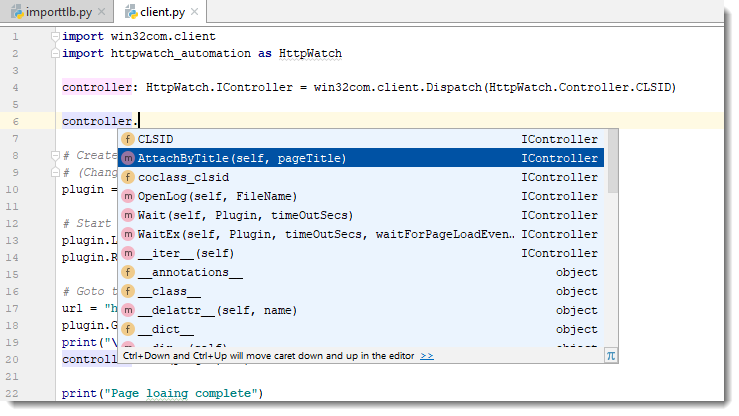
You don’t even need to specify the types for other variables that are used to hold values derived from the initial interface. The IDE can deduce their type by looking at the information in the Python binding file.
For example, the plugin variable is statically typed as the Plugin interface because the IDE knows that the New method returns a Plugin interface:
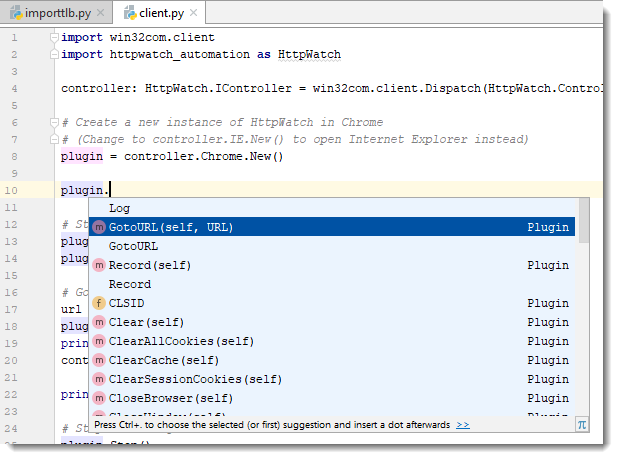
6. Write the rest of your code!
After setting up the type information you can then write the rest of the code required to interact with the COM library. Here’s an example that uses HttpWatch to open a page in Chrome and display some simple statistics about the network traffic:
import win32com.client
import httpwatch_automation as HttpWatch

controller: HttpWatch.IController = win32com.client.Dispatch(HttpWatch.Controller.CLSID)

# Create a new instance of HttpWatch in Chrome
# (Change to controller.IE.New() to open Internet Explorer instead)
plugin = controller.Chrome.New()

# Start Recording HTTP/HTTPS traffic
plugin.Log.EnableFilter(False)
plugin.Record()

# Goto to the URL and wait for the page to be loaded
url = "https://www.httpwatch.com/download/"
plugin.GotoURL(url)
print("\nWaiting for page to finish loading...")
controller.Wait(plugin, -1)

print("Page loaing complete")

# Stop recording HTTP/HTTPS
plugin.Stop()

if plugin.Log.Pages.Count != 0:
    print("\nPage Title: '" + plugin.Log.Pages(0).Title + "'")

    # Display summary statistics for page
    summary = plugin.Log.Pages(0).Entries.Summary
    print( "Total time to load page (secs):      " + str(summary.Time))
    print( "Number of bytes received on network: " + str(summary.BytesReceived))
    print( "HTTP compression saving (bytes):     " + str(summary.CompressionSavedBytes))
    print( "Number of round trips:               " + str(summary.RoundTrips))
    print( "Number of errors:                    " + str(summary.Errors.Count))

# Close down Chrome
plugin.CloseBrowser()