
In a previous blog post, we talked about the problem of using HTTP based resources, such as images, on a secure HTTPS page. Internet Explorer interrupts the download and displays a confirmation dialog whenever it detects the use of mixed content on a secure page.
In IE 7 and ealier, this dialog would cause annoyance to users but generally didn’t cause any other significant problems. This was because it was worded in such a way that most users would click on the Yes button and allow non-secure content to be downloaded.
However, the wording in the IE 8 version of this dialog has changed:
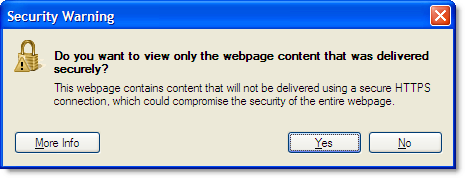
To download the content a user would now have to click on the No button. As we know, most people using the web only scan text and avoid reading it if at all possible! They will usually go for the Yes button if there is not an OK button.
Some sites are going to find that their secure pages in IE 8 have the following problems:
- Any non-secure HTTP image beacons used for analytics data gathering will often be ignored
- The page may not display or even work correctly if it relies on non-secure images, CSS or Javascript
Therefore, avoiding mixed content on HTTPS pages is even more important now that IE 8 has been released. It often becomes an issue when using third party services such as analytics or Content Delivery Networks (CDN). For example, we avoided the use of Google hosted Ajax libraries on our site until Google added HTTPS support.
As mention in the previous blog post, an IE user you can disable this warning by:
- Going to Tools->Internet Options->Security
- Select the ‘Security’ tab
- Click the ‘Custom Level’ button
- In the ‘Miscellaneous’ section change “Display mixed content” to Enable
However, if you are developing a web site you can’t expect your visitors to do this. It is better to fix the cause of the problem so that the warning is not displayed by default in IE 8. The only way to do this warning is to ensure that your HTTPS pages only access embedded resources using the HTTPS protocol. You can do this by following these steps:
- Use a sniffer like HttpWatch that supports HTTPS and shows files being read from the browser cache. The free Basic Edition is sufficient for this because you only need to see the URLs being accessed.
- Access the page causing the problem and click No when you see the security warning dialog.
- Any HTTP resources shown in the HttpWatch window are the source of the problem; even if they loaded directly from the browser cache and didn’t cause a network round trip:
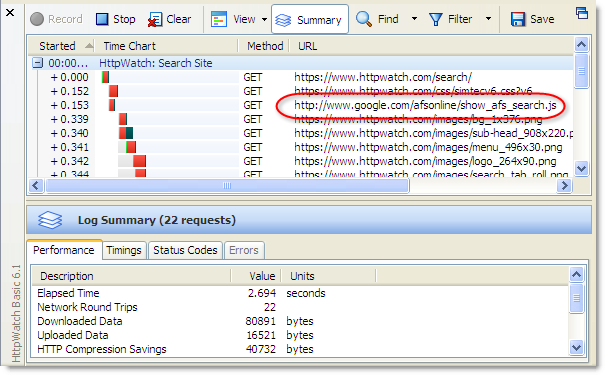
- If you don’t initially see any HTTP based resources, try refreshing the page because a non-secure image may have been retrieved from the IE or Firefox image cache
EDIT: If you are a web developer trying to track down why your page causes this warning please also take a look at http://blog.httpwatch.com/2009/09/17/even-more-problems-with-the-ie-8-mixed-content-warning/ where we cover some javascript snippets that can also trigger this warning. The comments section of both of these posts also contain useful information where people have found and solved related issues.
155 Comments
This error popup has been frustrating long before IE8, however- Microsoft actually has a point on this one. Shouldn’t really be serving non-secure content on a secure page. Let’s point the finger in the right direction and ask when google is going to give web developers an https/secure way to have analytics/adsense on our pages.
There is HTTPS support for Google Analytics. You can see this if you take a look at https://www.httpwatch.com with HttpWatch. In the page source you’ll some javascript code that performs the http/https switch.
Unfortunately, there’s currently no HTTPS support for Google Site Search. You’ll see this error if you visit https://www.httpwatch.com/search/ with IE 8.
Actually you can “correct” the problem temporarily by going to Tools>internet options>security>custom level>display mixed content: Enable.
The problem for me is gmail, i get it constantly when pics are downloading on HTTP email- almost all my emails. Hopefully google will fix this because gmail is the only site so far I’ve had this problem.
zac,
The ‘Display mixed content’ setting is mentioned in the previous post:
http://blog.httpwatch.com/2008/04/30/fixing-the-do-you-want-to-display-nonsecure-items-message/
However, if it’s your web site you can’t expect users to make this change in IE – it’s better to fix the cause of the problem,
It would be difficult for gmail to fix this because the images in email messages are not normally hosted by Google. They could provide an HTTPS proxy for embedded images but there may be considerable cost to setting up the infrastructure for that.
Why doesn’t Microsoft simply give users a choice when this pops up – annoyingly often? Click yes to be warned, click no to dispense with the warning. If been looking for a way to turn this off for 2 days until I found this blog. I’ll try Zac’s advise. Thanks.
Thanks a lot for Display mixed content Fix
Just to add to this discussion – from a users perspective seeing this message constantly can be annoying while surfing and it can be tempting to “correct” the problem by enabling mixed content as described.
However, I would caution against this as you may potentially allow unsecure scripts to run within secure pages – therefore a better approach is to make sure you select the “Trusted Sites” zone before making the change.
By only allowing mixed content from sites that you’ have told IE that you already trust you remain better protected with the default setting while surfing in the “Internet” zone.
Display Mixed Content to Enable does *not* fix this error for me. I have had it set to that for ages but since I downloaded IE8, it will not get rid of the message.
I’m a frequent reader of a message board that is secure (https:) and people have pictures in their siggies that link to non-secure sites, so I get this popup on literally every.single.thread that I try to view. It’s totally obnoxious. I’ve tried all sorts of other settings, exiting and restarting IE, restarting windows, double-checking the zones, etc. It won’t go away!
Same for me, whatever I do, this Message comes up all the time.
My Windows XP-Pro is a clean install with all security patches loaded.
I use avantbrowser (yes, teh latest one).
I have listed all known websites involved as secure. Doesn’t help (sic)
Anyone other ideas?
I am having the same problem – changed it to enable and it still pops up – IE8 Any advice welcome!
Thank you 1,000 times over for this easy fix to an extremely irritating “feature”!
Thanks
Thank you for this help. Very good!!
lots of people are stroggling with this, I wrote the simple answers for all this http://ebersys.blogspot.com/2009/03/do-you-want-to-view-only-webpage_27.html
Thank you for this help. I uninstalled IE8 previously just because it could not display image. I didn’t read the prompt message at all before until I read this article. :)
Gracias. It was getting pretty annoying. This was quick and easy.
Oh, thank you! I just updated to IE8 and every time I load a Twitter page, I get this freakin’ error. Very annoying. Spent some time poking around looking for how to turn it off and found your instructions. It worked, and I sincerely thank you!
And for those wagging fingers at developers, yes, it would be nice if all content were secure, but it would be even nicer if I could tell IE8 to always allow mixed content from this page (like a friend’s Twitter page) and it would just do it permanently without anymore security warnings every time I load the page.
Struggling to find best words to thank you enough. What a great help to fix a really irritating issue.
Amen and thank you. This has plagued me for ages and, foolishly, with my new Vista laptop I thought it would be fixed. It wasn’t. This is the perfect fix. My isohunt days shall be joyful once more lol.
Many many thanks
Thank you so much. It’s very fantastic to disable security warning pop up.
Very annoying that they decided to change from YES in IE7 and earlier to NO in IE8 to display mixed content.
Means users who are used to clicking Yes to view images now have to click No.
Almost all will still click yes resulting in images and/or Google’s “Maps”, “Analytics”, Etc… not being displayed, nasty. All any site needs to do is tag HTTP directories on their servers to be HTTPS accesble as well. When linking in from a secure site all existing files and sub-diretories down the tree will then be available both as secure content and/or non-secure content without making any other changes. I believe google now wants to charge for an “upgraded service” simply to allow https sourced maps, flip a switch and everyone pays?
WORK-AROUND
Trap for IE8 browser accessing your site and if “YES” is clicked trap for the inevitable resulting error that will occur.
Write a second pop up alert box that will display a warning directed specifically and only to IE8 users that “NO” must be clicked on the previous alert box to display content. Then only IE8 users users who have unfortunatley clicked “YES” will be bothered again with another alert and get some instruction as to what to do. Pain in the … for the user and webmaster alike.
Bless you! At work and home, this has been the single biggest PITA with IE8. Thanks!
You saved me from another Microsoft Migraine. Thank you. Now share this with the world, and tell Microsoft to read the book on effective human design next time they change something like this.
THANK YOU!! This stuff should not be that difficult to find…
Hello, the fix seems simple enough but when I go to “tools” -> Internet Options, there is not a “security tab” to select. The only tabs are “general, privacy, content, connections, programs and advanced”. Is it possible that my IT admin at work has disabled this tab so I cannot change the setting? I’ve looked through every tab for a “custom level” or “display mixed content” but I cant find it anywhere. Please help! Thanks!!!
Alex,
It looks like the Security tab can be disabled using a registry value:
http://www.pctools.com/guides/registry/detail/797/
Your IT admin group may have set this up to prevent changes.
THANK YOU so much for this information! I just started a new job this week, which allows me to work from home, but for which I have to quickly get materials prepared and revised. The usage of an electronic system, via this IE browser, was greatly slowed, due to this security warning.
Now that I’ve followed your instructions, that no longer happened, and I was able to get the tasks done much quicker. (I wish I’d known about & done this yesterday!)
To those who found that the enable mixed content did not work, I was getting the same thing. But then I found out that the web sites that I had added to the Trusted area in the Security tab still got the message. I clicked on the Trusted button to highlight it then went to the Custom area and found I had to enable the mixed content there as well.
I think I tried every other IE setting except for ‘Display mixed content’. Thanks for the tip!
Thanks for the tip about disabling the security warning. That was driving me crazy.
I stopped using IE a long time ago. Things like this post are the reason why. I’ve been using Firefox for years and have never looked back. I like Firefox so much better.
NOTE TO DEVELOPERS: I’ve been trying to solve this issue with a new web site of ours and the problem, it turns out, is the CODEBASE of the tag for the Flash player. I installed the free version of the tool mentioned in this blog, and it showed all of our images, scripts, stylesheets, etc. were secured via HTTPS, but the codebase wasn’t so IE8 was giving the security dialog.
I was hopeful that HttpWatch would show me something that a javascript was loading, but alas, it doesn’t show up in HttpWatch, understandably (after I finally figured it out) because the object (Flash player) is neither loaded from a web page or from the browser cache — it’s already installed.
And, by the way, it doesn’t matter if you select “Yes” or “No” at the security prompt because the Flash object is loaded either way. So why show the dialog??? I can see if IE8 didn’t allow the “object referenced from (but not necessarily installed from) a non-secure page” to execute, but this is not the case.
Therefore, simply change the codebase from “http://…” to “https://…” and this [one] issue will go away.
-john
P.S. Firefox and Google Chrome do not give any such security warnings and they both show the padlock icon indicating the site is fully secured.
Cheers for the steps to turn off this security warning! Too bad Microsoft can’t provide manuals for these inconveniences, have to rely on you guys. Thanks heaps.
THANK YOU!
I thought I’d share my experience of this. My site is in a Trusted Zone. So to remove the message, I did what everyone else was suggesting and changed the Display Mixed Content setting to “Enable” for the zone. But this made no difference.
I was able to fix my problem by changing it for the Internet zone. Even setting the Trusted Zone setting back to Prompt makes no difference – it must be an IE8 bug where they forget to look at the zone when choosing whether to show the dialog.
Nick
When a user goes to the secure section of my page in ie, they don’t get an error message, but the secure symbol shows for a second – then dissapears. If they refresh or come back to the page, the symbols shows up and stays after that. Everything works fine in firefox and chrome. Why would ie do that? Is it still secure if I get no errors but no symbol?
Mike,
You would get that behaviour if the warning was turned off in Tools->Internet Options and the page had some non HTTPS resources. You may also be interested in this follow up blog post:
http://blog.httpwatch.com/2009/09/17/even-more-problems-with-the-ie-8-mixed-content-warning/
Thanks for the response! Couple more questions… First of all, the warning is not turned off. Why would the padlock not show up until after a simple refresh of the page? All the same content is showing up? Also, I don’t get errors in other browsers and the padlock signal is displayed fine. I understand that they probably have the warning turned off, but wouldn’t the padlock not show up in those browsers if there was an issue?
Mike,
It looks like you have run into a different, but related problem
I found the code that was causing my problem.
google.load(“jquery”, “1.3″);
A couple questions though. First, I had an .asp script that said if it was a secure connection, don’t show that piece of code. So, when I looked at the source code on the page this piece of code didn’t show up. I always thought all .asp code ran before any javascript, but that doesn’t seem to be the case here? If I took this code out all together, it works fine.
Second, why would it show up secure after a simple refresh? Any thoughts would be appreciated.
Firefox.
Yes, I just had to since no one else has.
“Do you want to view only the webpage content that was delivered securely?” I was getting this in my Cox.net webmail on ever e-mail I opened. Thanks for the tip. This fixed my proble.
This problem cost me about half a day to fix, it ended up being a line in sorttable.js, a javascript that sorts tables in custom ways.
It ended up being somewhere around line 380:
/*@if (@_win32)
//document.write(“”);
//var script = document.getElementById(“__ie_onload”);
//script.onreadystatechange = function() {
// if (this.readyState == “complete”) {
// sorttable.init(); // call the onload handler
// }
//};
document.observe(“dom:loaded”, function() {
sorttable.init();
});
/*@end @*/
replacing the above code fixed it, but you need to have prototype on that page. This was just a quick fix, maybe there is a better solution, but i haven’t found one on google. Hope this helps someone.
Thanks for telling us how to turn off that pop-up, it’s the world’s most annoying thing. Why don’t big companies think before they implement something like that, it drives me mad. Cheers
Thank you for the posting. I just used wireshark to sniff since I already had it installed but it led me to the page that was referencing a hard coded HTTP link. Changed it to a relative link and everything is working now.
The company who built the web application said “it should just work with HTTPS. No need to do anything special.”
Thanks – that message has been frustrating me for awhile
thank you!
Thank you SO MUCH for helping me remove this annoying pop up!
Thank You so much! You have saved me a lot of searching for this fix!
Thanks. This was very helpful.
Worked fine, wish it was default setting :P.
I was beginning to think gmail was the problem, because every computer I used IE8 on was doing this.
Thanks for the tip… I use Gmail, and every single time I would open an e-mail with pictures, that stupid Microsoft dialog box would pop up… jeesh…
Personally, I don’t like Microsoft thinking for me… and I am glad for a way to turn off that stupid, annoying box…
Just another way to infringe upon my rights of free expression and implement more industry-imposed crap without my say so…
How hard would it have been, or be, to include a “don’t show this box again” radio button…
Microsoft = Big Brother… thanks for thinking for us, we are surely too stupid to think for ourselves….
It’s very displeasing when a big company like google or windows micro deliberately stick you in the face with their arrogance thinking they are God. And won’t allow you the time of day. Before they disrupt your peace and quiet. With dirty little quirks that make one mad. Thanks for the help.
Yet another epic fail from Microsoft.
I support a website for the UK National Health Service, which I have to access 20+ times a day. This is obviously in my ‘Trusted’ zone, but even with the “Display mixed content” set to Enable this warning still came up every time I moved from one page to another. The only way I’ve managed to stop it is to set the whole Internet zone to the same (insecure) setting.
As other people have said, how difficult would it have been for MS to include an option of ‘don’t warn me again for *this* website’ ? As always they seem to live in their own world and never respond to complaints/feedback from the rest of us.
Fail, fail, fail.
thanks for helping with ridding of that most annoying msg
i am a developer and i have developed a magento website. I am getting this error in IE8, please advise how can i get rid of this warning message? its very frustrating for customers
That was extremely helpful being able to turn off the warnign message.
Thanks
Thanks, that was really getting on my nerves yet so easy to fix. Kudos to you :)
It makes displaying external content in a secure WSS installation impossible. Great. Even certain themes that M$ includes in a WSS installation throw this error, so certain color themes cannot be used. Way to go…
OMG! I HATE YOU IE!!
This is very irrerating bug in IE8. Don’t know why MS can’t make this much user friendly like firefox of Google Chrome…
All of these solutions sound great if it’s annoying you. However, from a development standpoint, do you really want grandma having a pop-up on her screen, not understanding it and leaving because of it? No.
An easy way to get rid of the issue it to make the download link for the flash plugin a https link which works just the same as the http link. Either will give you the download file. For the pluginurl field just use https://www.adobe.com/. Yeah it doesn’t direct them to the exact location of the plugin, but anyone should be able to see that big link once they get to adobe’s site that says “download flash plugin”. This should get rid of the adobe plugin issue. Besides, who doesn’t have flash nowadays?
As far as google analytics is concerned they do support https and it is built into their js code.
Links to outside sites not sources will not cause a problem.
Check your CSS to ensure that you’re not using http for links to background images etc. Do not use https links either, as this is not good practice. Use relative paths in css (and for that matter anywhere) and not absolute paths. That avoids the need to use http or https.
But as pointed before, in
http://blog.httpwatch.com/2010/02/10/using-protocol-relative-urls-to-switch-between-http-and-https/
developers can use relative protocol to solve this problem.
I am a UK doctor using the NHS Choose and Book service to refer patients to hospital and this only works on MS IE. Generally we have been told to use the nice old insecure IE 6 or 7 but along comes the Browser Ballot and a moments lack of concentration at a presurised moment and ooops, I am upgraded to IE8. Far too secure for the good old NHS which uses mixed content on their pages and doubles the number of clicks to get around the already dire software. It seems the only solution is to allow mixed content on all sites so that’s jolly secure isnt it! So an attempt to make it more secure makes it less so. As Jim says; FAIL!
Hey thanks a lot for sharing such a good article,informative stuff here. Glad I found your site. Good content and very helpful.
The main differences between the Firefox and IE is Firefox allows you to surf the Internet
safer and faster, and it displays the Internet the way that it was intended to be. Firefox also gives you more web page viewing space so that you can see more than you would with other
browsers. The main difference that you’ll see is that Internet Explorer has gray behind its images, Firefox doesn’t.
By the way for more information on Professional training and Certification for Security courses check this link: http://www.eccouncil.org/certification.aspx
sogolfer – very good comment at number 21 regarding propagating the HTTPS down the tree when a developer is writing a webpage! I am SURE that it would work without having to change the settings for developers who can’t give their viewers the option of viewing mixed content when it should not be necessary to start with if HTTPS was 100% of the content. Nice one :-) Not a member of this forum yet but found this post extremely interesting to read. – Andrew aka Autolycus.
http://blog.httpwatch.com/2009/04/23/fixing-the-ie-8-warning-do-you-want-to-view-only-the-webpage-content-that-was-delivered-securely/#comment-10567
Just like to let you know that this comment fixed this problem on the website I’m developing. For IE6-8.
We are having this problem with the addition of the Google Translate script. They say it is compatable wtih https sites but it causes the aforementioned annoying alert. Even when I altered the url from http to https.
I appreciate the trick to changing it on my IE* but I also need to find a solution for the rest of our 1200 visitors per day. Any suggestions for me?
Here is the script they give to use plus my https alteration:
function googleTranslateElementInit() {
new google.translate.TranslateElement({
pageLanguage: ‘en’
}, ‘google_translate_element’);
}
OMG…. Thanks so much for the fix, its been driving me so so so so crazy!!!
Want a ‘real’ fix? Get a real web browser, FireFox. Every serious web developer I know (including myself) uses FireFox. IE (any version) is a developers nightmare especially IE6. Do yourself a favor and use a real web browser rather than waste time with the never ending glitches found in pretty much every Microsoft product.
Clicking only Enabling Miscellaneous doesn’t work.
You need to select – enable “Disply mixed content”
1.Going to Tools->Internet Options->Security
2.Select the ‘Security’ tab
3.Click the ‘Custom Level’ button
4.In the ‘Disply mixed content’ section change “Display mixed content” to Enable
Click Tools -> Internet Options -> Security (Tab) -> Trusted Site -> Sites -> Empty Websites Box and uncheck “Require server verification”
Hope this will help u. Thanks
This still did not solve the problem. I have enabled to display mixed content and I still get to see this problem. Is there any other workaround?
Thanks.
Finally.
Thank you for saving me from throwing myself off of a tall building, after I carried out the murder of my computer I had been plotting if that damn thing popped up “one more time”.
:D
@Marie: Ha ha, that’s too funny. I know just how you feel. Good thing I ran into this blog.
@httpwatch.com: Thanks for the fix. I thought there might be some kind of browser setting I could modify to get rid of that wonky pop-up, but didn’t know which one. Everytime I went to Twitter.com, that warning message reared it’s ugly little head.
The problem is IE8 in combination with Ajax-content. When I add an image to te page with my Ajax-script the url in Firefox is https://mysite.com/image.jpg with IE8 it’s http://mysite.com/image.jpg.
The errormessage of IE8 is correct, the way it handles Ajax-requests isn’t.
this problem happens when i log out of my virgin mail and just before my virgin home page comes back
using i.e.8 it dont happen any where else
RE:
Posted December 26, 2009 at 4:45 pm | Permalink
This problem cost me about half a day to fix, it ended up being a line in sorttable.js, a javascript that sorts tables in custom ways.
It ended up being somewhere around line 380:
Response:
Another way to fix this very annoying error with this piece of script, is to do the following
/*@if (@_win32) document.write(“”);
/*@end @*/
then create in sort_defer.js script file that contains 1 line of code.
sorttable.init();
But thanks for your original response.. i was at about a full day when i found your code that lead me to the above non-protype dependant solution.
I use godaddy’s website tonight builder because I dont know how to build websites. Is there a way I can still take care of this annoying problem?
Hi, I was also facing the same problem of SECURITY WARNING IN GMAIL . The permanent solution to the problem is not refreshing the page or using a different browser. The answer was there all along. Next time you log in to GMAIL go to Settings ( right hand top corner ) and on the bottom of the default settings page ( General ) you will find a Browser Connection option. There are 2 buttons. By default neither of them is selected.
Click on > Don’t always use https. Save settings.
Or if by mistake you might have clicked on Always use https earlier, then change to Don’t always use https.
That’s it. Problem solved.
Does anyone know a decent alternative to httpwatch for the mac?
thanks
Only Microsoft can come up with an error message as convoluted as this, which doesn’t even need to be displayed!
Re:
Posted August 2, 2010 at 10:43 am | Permalink
Does anyone know a decent alternative to httpwatch for the mac?
thanks
Try:
Fiddler installed over firefox.
It worked for me perfectly!
I was looking for the solution for hours(almost killed myself) and finally found it.
Thanks so much.
Thanks- I appreciate the time and effort you went to to help others! Nice one…
Peter
Thank you! This worked. The problem was very annoying and a waste of time :( Mostly gmail, but not only. So far, seems solved…!
Many many thanks for this suggestion.
this blog really helpful for me as i have fixed the issue immediately by reading the instruction from this blog
THAAANKS!
Thank you! I have been dealing with this prompt for a while and you gave me the answer to stop it. Great post
It is really good.
Thanks
While changing the settings from within gmail I dont get the internal warning when opening gmail. However, my problem still persists. From google main page, clicking on gmail link at top of page, I still get the mixed content warning. In IE8 I have google, google-analytics in trusted sites. On all internet security options (Internet zone, intranet zone, trusted sites) I have enabled mixed content. I still get the pop-up warning. I have installed httpwatch (basic), but don’t quite know what to do with it. It tells me what websites open to get to gmail, along with warnings, but I can’t change how the websites get handled. I have successfully made the change on other pc’s in the home, but my laptop (Vista Ultimate) still won’t clear the message. Any thoughts?
Does anyone have a hack for just suppressing this stupid error message? I am in a bind where I’ve developed an application around google maps, but since Google Maps is unsecured causes this error message. Users instinctively click “yes” and the whole application is useless.
I don’t want to re-develop the whole application around bing maps or anything, and the only way to get secure content from Google Maps is to pay $10,000/year for their “premier” service! My God, what a mishap :(
Wow this is really great.
Thanks
How do I detect which part of the webpage causes the problem? I’m trying to fix it on my site
Thanks
i have a problem that Due to the implementation of HTTPS over the entire site Google maps gives a warning of unsecured content. If anyone have solutions please send to my email
This issue is also caused by viewing websites in compatability view. I have a website I know 100% all items are secured over https but still I was prompted that it was mixed content. I want to be prompted when there is mixed content on a page so I didn’t switch this off in IE8. As soon as I switched off compatability mode, I was no longer prompted :)
Hey, thanks for the solution. Stupid pop up box was annoying. Life is short, saving some time. Problem solved. Thanks again.
Thank you! This message is a waste of time; glad I found this way to disable it.
Thanks for the easy fix! The pop up eventually came back, but I knew how to fix it.
Personally I think it’s a great idea that MS has incorporated this feature into IE. It may be annoying but it sure is foolish to turn it off. As a developer I am having to deal with this issue for a login page to a secure payment site. Would you as a user really want to go to a login site that has a JS file embedded in it from HTTP site? I wouldn’t, and if you turn off this feature in IE then you will never even know that some one just grabbed your credentials. Ignorance is bliss so they say :)
redir,
It’s certainly a good idea for developers to be aware of the issue, but what about the hundreds of millions of ordinary users of IE?
It’s just going to annoy them as they try to work out whether to click Yes or No. If you are going to force a response over an issue like this why not also highlight any attempt to submit a password field over a HTTP connection? That’s far more signficant but is ignored by IE.
Thanks, the solution for me was the HTML for embedding a Flash file that had a http:// link to download it Flash.
@john, the code base guy.
Thank you Thank you Thank you Thank you Thank you Thank you Thank you Thank you Thank you Thank you Thank you Thank you Thank you Thank you Thank you Thank you Thank you Thank you Thank you Thank you Thank you Thank you Thank you Thank you Thank you Thank you Thank you Thank you Thank you.
THanks, that’s great! I still use IE despite all the other fancy browser out there… i just cant get used to them.
For WEB DEVELOPERS:
HTTP (instead of HTTPS) in the CODEBASE tag for Flash is not the only cause of this issue. In fact, referencing ANY non-SSL file or location will prompt this error.
Keep in mind that even if you reference an external .js file (such as for Google Custom Search or other Google services), the external .js file may contain code that references non-SSL resources. This is precisely what was happening in my case: Google Custom Search’s external .js file ( https://www.google.com/uds/api/ads/2.0/71b547d3958f7b56072a3e9c6964a9ee/search.I.js ) was referencing the Google logo over HTTP ( http://www.google.com/coop/intl/en/images/google_custom_search_watermark.gif ).
To find the cause of the problem, install the Basic version of http://httpwatch.com (as the original article states) and right-click the page in IE, choosing “HttpWatch Basic”.
Clear IE’s history (Tools -> Internet Options -> General tab -> Browsing history -> Delete… -> Check Temporary Internet files -> Click “Delete” button); this prevents cached objects that you may already have addressed from causing the error.
Then, hit the red “Record” button in HttpWatch before refreshing the troublesome page. Wait until IE throws the error dialog, and take note the last file that loaded in HttpWatch’s topmost pane before the warning. After pausing for 10+ seconds, click the “No” button in IE’s warning dialog. If you waited long enough before clicking “No”, HttpWatch should have put somewhat of a “gap” between the last file that was loaded over SSL, and the file that’s causing the problem (because the logged entries are separated when there’s a sufficiently long pause between the requests).
Even though I’ve determined the issue to be with Google’s AJAX-driven Custom Search files, I have not yet found a solution. I’ll post back if I do…
Ben,
Thanks for the tip about waiting before clicking No.
Google Search causes a problem for use too:
https://www.httpwatch.com/search/
Please let us know if you find a solution.
this was very helpful…i am a novice…thank you
This error is the bane of my existence. I hate IE! 99.99% there is no security threat and all you have to do is change the image/file source from http to https; that does not really make it more “secure”.
At least it would be helpful for the dialog box to point out what’s causing the error.
AAARRGH!!!!
Cheers, this has been a helpful article! Couldn’t get rid
of that security warning, was very irritating!!
Good thread fixed my headache. Maybe Microsoft / MSN should
get its act together as that is the reason i came across this
thread to destroy that annoying popup everytime i went to check my
Hotmail :P
Thank you so much that warning was getting on my klast
never.
God Thank You so much this was driving me nuts, pretty much
every page besides google was bringing up that popup… drove me to
d/l Firefox and Chrome just to avoid it… lol ty again
thank you thank you thank you1
Of course one could start to use a decent browser…
Chrome, Firefox, Safari, Opera and ditch IE
thanks for the info :) ( problem fixed )
I don’t know if part of my problem is that I’m still using Windows XP Home, but this problem has more recently extended to Yahoo Mail’s sign in page! I’m fairly certain that the security of their entire webpage is too liable to be threatened by allowing the “unsecure” content to download!! By following the directions near the top of this page did indeed fix this issue. Of course, that still leaves the problem that many less tech minded individuals (my wife is included amongst them) won’t have the patience to try and fix the problem. Instead, there should be a “never display message” again checkbox on the alert itself. That would be a much more practical solution!
change “Display mixed content” to Enable
this suggestion helped me. thank you.
Thanks for the secuity pop up fix.
Cheers, Dave
Well, i changed these settings in Internet Zone & the Trusted Sites Zone. Even though i was facing issue in Trusted zone, i had to change it in both of them to take effect.
Interestingly though, i never saw these pop-ups before installing DivX on my system. Probably it triggers some security check mechanism that is not known.
I still can’t to where I need to go even after enabling the mixed content option. So frustrating. Any words of wisdom?
Can you do that in IE8 running Windows 7? I do not see the misc. section under the security tab.
Did you click on the Custom Level button?
The simplest fix is to use firefox.
The “enable” mixed content fix DID NOT work for me. Check under Tools-> Manage Add-ons-> Toolbars and Extensions. I would disable any toolbar that is listed “Not Verified”. The one that got in my browser is “Superfish – Window Shopper”. I’ve reported it to Microsoft, probably malicious.
Thank you for this post!
This was amazing, I was running this issue for long time but you help me in less than one minutes…
Thanks for the solution.
I was going crazy with this one popping up several times a day
Thank you very much for your solution. I was facing the pop up for a long time. It was very disgusting to me.
Thank you very much, it’s fixed. The message was driving me crazy.
Sorry! But I didnt understand anything.When this message pops up in IE8 then what to press YES/NO?If I dont want to compromise with my security,then should i press YES?
thanks a lot it works of IE 8
Oh! I Love You!!!
Seriously. I’ve been dealing with this obnoxious mixed content thing for ages and ages…
thanks a lot it took care of that annoying security sign.
I find it interesting that a lot of people have this problem with their home computers… when a simple fix is to install a better browser. I have never had a similar problem with Opera, Firefox, or Chrome! I can understand if you’re in a corporate environment though, as I am the only times I use IE8… and they dont want anything better installed. Bah, knuckleheads.
Anyone know if IE9 has the same problem? It actually looks to be a pretty decent browser (the last decent one MS has done was IE4 imo) It’s still not quite to my own tastes (variety is wonderful!) but that’s just me :)
thanks this helped!
This was Pretty helpful in getting rid of this annoying pop up!
Thanks for such resourceful Stuff!!!
Nitin Singh
this worked great thanks so much
Hi,
thanks lot this fixed my issue .
Thanks. The pop up from microsoft was annoying. But overall security has improved and i havent had a virus attack for a long time. So microsoft deserves some credit too. But the pop up at frequently used sites like gmail was a pain and i changed it by enabling the miscellaneous content as described here.
Thanks this was driving m crazy … it was always on a site i use all the time for my bussness.
The firefox show “This web site does not supply ownership information”
why?
This has help me and my coworkers out immensely.
Many thanks,
Louie P.
Thank you SO much for this info. This pop-up is more annoying than most ad-pops on sites.
Thanks. quick fix but suggest to check the security of the website in question.
Really a great help to fix a really irritating issue
I noticed when trying to use this method with a website setup in the “Trusted Site” Zone. If you change this setting for Trusted Sites, it doesn’t seem to take effect. For some reason the “Internet Zone” works for all Zones though!
I’m using IE 8.0.6001.18702
I had this problem but little complex. The server is in intranet domain and it was referring to an internet site. So the warning message has gone only after setting Enable for ‘Display Mixed Content’ for both internet and intranet domains.
I get this error for websites in my trusted list, even though I have already set “enable mixed content” for this zone. How can I fix this?
god I hate IE…stupid meaningless warning after stupid meaningless warning
It worked like a charm. I finally got fed up with this error message (security warning) and turned it off. If Chrome or Firefox don’t see the need to warn me about it, then who gives a crap. Rsbrux is right, if you add the site to the trusted list, you shouldn’t be warned about this.
Thanks for the post :)
I go to Tools->Internet options etc etc. and change the Display Mixed Content to enable, but it makes no difference whatsoeve. The messages keep coming up. It forces me to use Google Chrome quite a bit. I really want to use ie8, but can’t tolerate that stupid warning coming up all the time. Any ideas?
MS can do better than that.Either change the wording with a “Dont show this again” check box or leave it to windows essentials to assess the risk.
so i do it…and never does it work…what are you talking about?
Thanks for the instructions on how to disable the security warning. My google search switched to https:// today and every time I went to my homepage and when I opened others, I had to click No twice to even move forward. Now… it’s searching as usual. Thanks!
7 Trackbacks
[...] finally got sick of the warning message today and did some googling. Thanks to this post at the HTTPWATCH blog I have fixed my [...]
[...] an HTTPS page that loads resources with “http://” in the URL, IE halts the download and displays an error dialog. This is called mixed content and should be avoided. How should developers code their URLs to avoid [...]
[...] http://blog.httpwatch.com/2009/04/23/fixing-the-ie-8-warning-do-you-want-to-view-only-the-webpage-co... Configuración, Https, Internet Explorer 8, Opciones de Seguridad Dejar un comentario Trackback [...]
[...] I got the solution on below given link: http://blog.httpwatch.com/2009/04/23/fixing-the-ie-8-warning-do-you-want-to-view-only-the-webpage-co... [...]
[...] Don’t use HTTP based resources on a HTTPS page [...]
Do you want to view only the webpage content that was delivered securely?…
Does Internet Explorer annoy you with this security warning? This message appears when you’re using a secure connection (https://) and the website is trying to load non-secure (http://) elements, too. The culprit was easy enough to find (using Ht…
[...] asked "Do you want to view only the webpage content that was delivered securely?" This fixes the issue. Any idea how to push this fix around the network? I did try AD IE policy and got as far as [...]