
Why is Google so Fast?
 November 5, 2007 in
HTTP , Optimization
November 5, 2007 in
HTTP , Optimization
It’s no coincidence that the most successful search engine on the planet is also the fastest to return results. Here are some time charts from HttpWatch for Google and its two closest competitors; Yahoo and Live.com:
Google.com returns its results page in 0.155 seconds:

Live.com returns its results page in 0.619 seconds:

Yahoo returns its results page in 1.131 seconds:

These screen shots were created by visiting the home page of each search engine with an empty cache and then entering a search term while recording with the free, Basic Edition of HttpWatch
After clicking the ‘Search’ button, the results of the keyword search are delivered by Google approximately four times faster than Live.com and seven times faster than Yahoo. How do they manage to do this?
Clearly, the time taken to lookup the results for a keyword is crucial and there’s no denying that Google’s distributed super-computer reputedly running on a cluster of one hundred thousand servers is at the heart of that. However, Google has also optimized the results page by applying two of the most important aspects of web site performance tuning:
- Make less HTTP requests
- Minimized the size of the downloaded data
The Google results page requires only one network round-trip compared to the four and eight round-trips required by Live.com and Yahoo respectively. They have achieved this by ensuring that the results page has no external dependencies. All its style information and javascript code has been in-lined with <style> and <script> tags.
You might be wondering how the Google logo and other images are rendered on the results page since Internet Explorer does not support in-lined image data. Well, that’s a little more subtle. When the user visits the Google home page, the image nav_logo3.png is pre-loaded by some background javascript (hence the separate page group in HttpWatch):
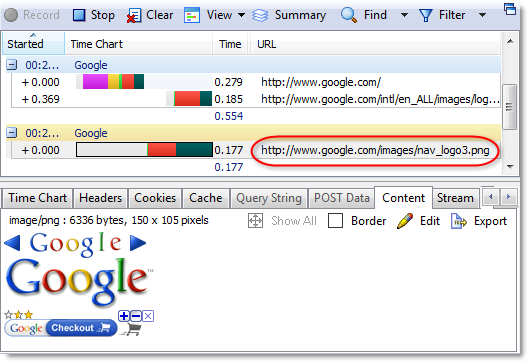
The image wasn’t actually displayed on the home page but it was forced into the browser’s cache. When the search results page is rendered by the browser, it doesn’t need to fetch the image from google.com because it already has a local copy. It didn’t even register in HttpWatch as a (Cache) result because Internet Explorer loaded the item directly from its in-memory image cache.
As you can see from the screenshot, nav_logo3.png doesn’t just contain the Google logo. It also has a set of arrows and the Google Checkout logo. This is because the results page uses a technique called CSS Sprites. All the images used on the results page are carefully sliced out of this single aggregate image with the CSS background-position attribute. The use of this technique has allowed Google to load the search page images in a single round-trip.
The other major advantage of the Google results page, over its competitors, is the amount of data that is downloaded. You can see this by looking at the highlighted values in the HttpWatch page summaries:
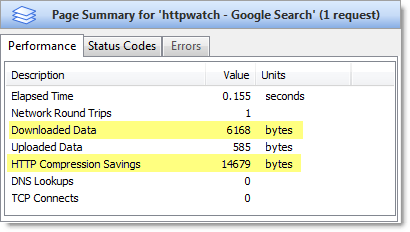

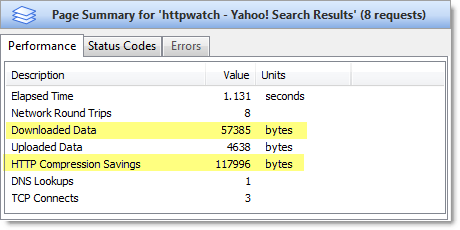
The Google results page only requires 6 KB of data to be downloaded, whereas Live.com requires 16 KB and 57 KB for Yahoo. All three search engines use HTTP compression, but Google’s results page requires less data because:
- Their page is simpler so it requires less HTML
- They’ve avoided extra round-trips for script and CSS. Each round trip requires HTTP response headers and adds to the total amount of data that has to be downloaded. In addition, HTTP compression tends to be more efficient on a single large request rather than several smaller requests.
- The HTML is written to minimize size at the expense of readability. It contains very little white space, no comments and uses short variable names and ids.
Not only do these techniques improve the performance of the Google results page, they have the added benefit of reducing the load on the Google web servers.