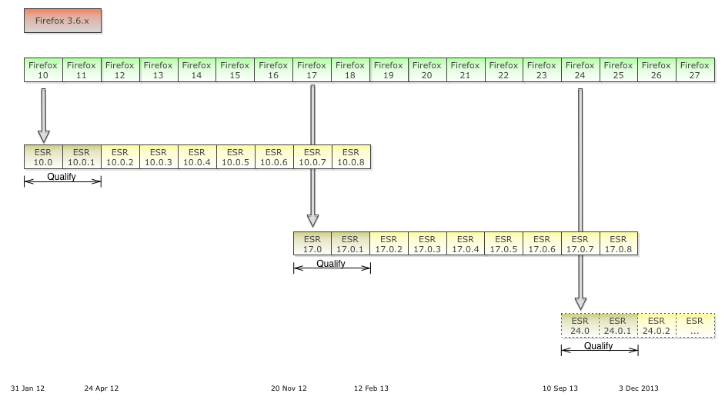
Firefox 35 was released this week and became the first browser to enable support for the HTTP/2 protocol by default.
The HTTP/2 specification has not been finalised so Firefox actually enabled the Draft 14 version of HTTP/2 but little is expected to change in the final draft. Google is now supporting HTTP/2 draft 14 on its web servers alongside the SPDY protocol giving us a chance to compare the performance of raw HTTPS, SPDY and HTTP/2 on the same web page.
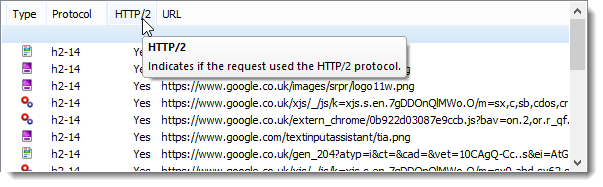
We also updated HttpWatch this week so that it supports HTTP/2 within Firefox. It has new columns to display information about the protocols being used by each request:
The Performance Comparison
The performance test used HttpWatch with Firefox to run a series of simple page load tests against the Google UK home page using the three protocols:
- Raw HTTPS
- SPDY/3.1
- HTTP/2
We switched between the protocols by enabling and disabling the following entries in Firefox’s about:config page:
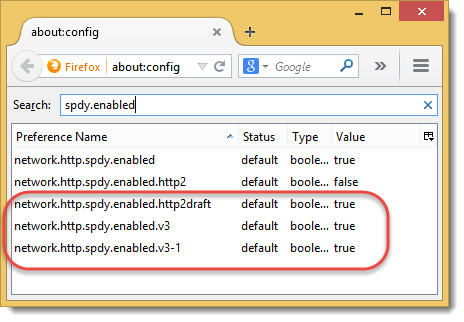
Each test was performed in a fresh instance of Firefox with an empty browser cache. Although this testing was simplistic and only used a simple page it does highlight some important differences between the protocols.
Test #1 – Size of Request and Response Headers
Most sites already use compression when downloading textual content as it provides a significant performance benefit. Unfortunately, HTTP/1.1 doesn’t support the compression of HTTP headers that are attached to every HTTP request and response. SPDY and subsequently HTTP/2 were designed to address this shortcoming using different types of compression.
SPDY uses the general purpose DEFLATE algorithm whereas HTTP/2 uses HPACK that was specifically designed to compress headers. It uses predefined tokens, dynamic tables and Huffman compression.
It’s possible to see the difference in the generated header sizes by looking at a request that has no content. On the Google UK home page there is beacon request that returns no content (a 204 response). These screen shots from HttpWatch show the size of the request headers in the ‘Sent’ column and the size of the response headers in the ‘Received’ column:



WINNER: HTTP/2
HTTP/2 has significantly smaller header sizes due to its use of the HPACK algorithm.
Test #2: Size of Response Message
The response message from the server is made up of the response headers and the encoded response content. Given the fact that HTTP/2 creates the smallest headers shouldn’t it always have the smallest response message?
In HttpWatch this seems to be the case for image resources:



However, for textual resources SPDY consistently has smaller response messages even though its headers would be larger than HTTP/2:



The reason for this is the optional padding bytes that can be added to the HTTP/2 DATA frame. HttpWatch doesn’t currently show the padding but in our debug logs we can see that the Google servers add padding to the data frames of textual resources. The reason given in the HTTP/2 spec for using padding is:
Padding can be used to obscure the exact size of frame content, and is provided to mitigate specific attacks within HTTP. For example, attacks where compressed content includes both attacker-controlled plaintext and secret data (see for example, [BREACH]).
Padding isn’t used for image resources because they already have a compressed format that will not contain attacker controlled plain text.
WINNER: SPDY
The larger response bodies seen on the Google servers are due to the use of padding in data frames. Although, HTTP/2 produces larger responses than SPDY its encrypted connections could potentially be more secure. This may be an area where tuning can be performed in a trade off between security and performance.
Test #3 : Number of TCP Connects and SSL Handshakes Required During Page Load
Browsers achieved a performance boost in HTTP/1.1 by increasing the maximum number of connections per host name from two to six or more. This allowed greater concurrency during the download of a page at the cost of extra TCP connections and SSL handshakes . Increasing concurrency allows the bandwidth of the network to be used more effectively because it reduces the blocking of requests.
SPDY and HTTP/2 support concurrency on a single TCP and SSL connection by using multiplexing to allow more than one request at a time to send and receive data on a single connection.
By adding the ‘Connect’ and ‘SSL Handshake’ timings as a columns in HttpWatch you can see that SPDY:
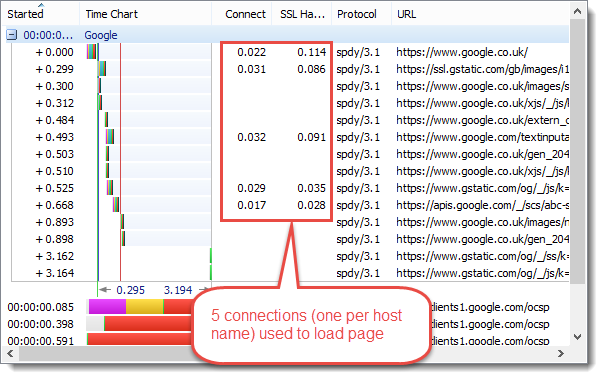
And HTTP/2:
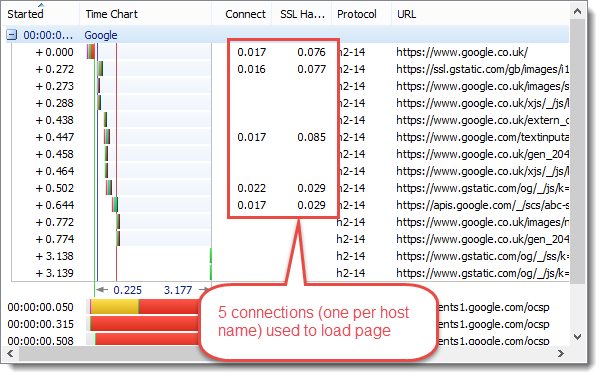
Only create connections for different host names. Whereas, raw HTTPS may create more than one connection per host name to improve concurrency:
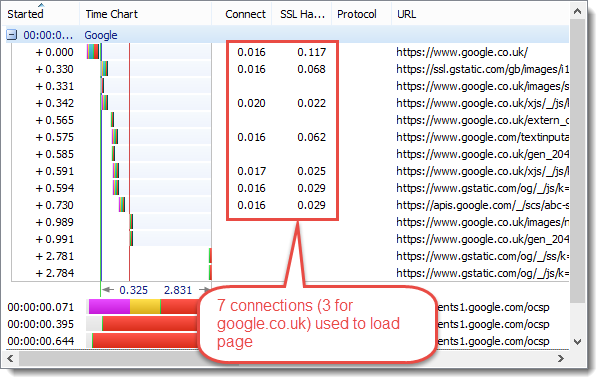
EQUAL WINNERS: SPDY & HTTP/2
The multiplexing support added in SPDY and HTTP/2 reduces the number of connections that have to be setup to download a page. As a side benefit web servers will not have to maintain as many active TCP connections when HTTP/2 usage becomes more widespread.
Test #4: Page Load Time
The ‘Page Load’ event in HttpWatch shows when the page was fully downloaded and available for use. In most cases this a reasonable measure of the speed of the page as seen by a visitor to a web site.
The screeen shots below show the Page Load time for each of the three protocols: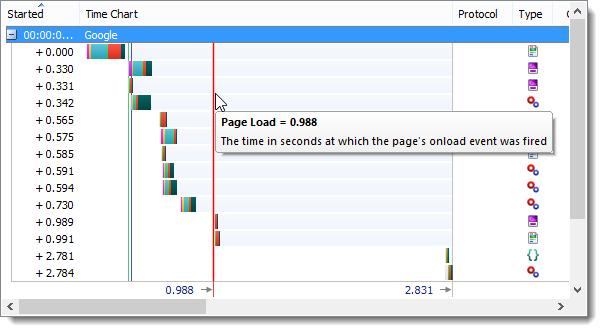
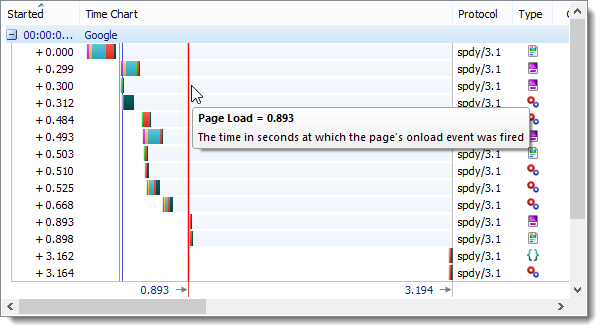
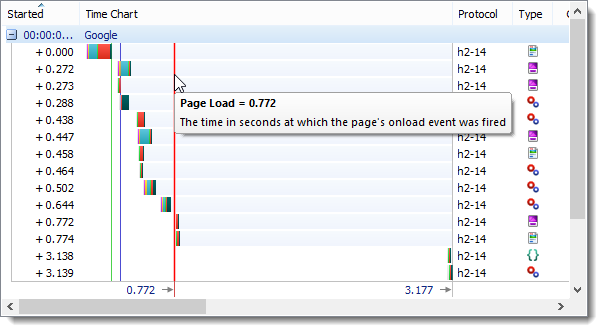
WINNER HTTP/2
The Page Load timing was worse for raw HTTPS probably due to the lack of header compression and the additional TCP connections and SSL Handshakes required. For more complex pages the speed advantage of SPDY and HTTP/2 should be even greater.
We also found that HTTP/2 was consistently faster than SPDY even though its response messages were often larger. The advantage was probably due to the smaller GET request messages produced by HPACK compression. Our network connection to the internet, like many others, is asymmetric in nature – the network upload speed is less than the download speed. This means that any saving in uploaded data has much more impact than the equivalent saving in downloaded data.
Conclusion
HTTP/2 is likely to provide significant performance advantages compared to raw HTTPS and even SPDY. However the use of padding in response messages is an area of potential concern where there could be a trade-off between performance and security.
You can check for HTTP/2 using our new SSL test tool
SSLRobot . It will also look for potential issues with the certificates and TLS/SSL configuration used by your site.
Try it now for free!