

 Blog
BlogFive Tips For the Effective Use of PNG Images
 May 29, 2008 in
Internet Explorer , Optimization
May 29, 2008 in
Internet Explorer , Optimization
Tip #1: Be Aware of PNG Limitations in Internet Explorer
The Portable Network Graphic (PNG) format is well supported by modern browsers (e.g. IE 6+, Firefox 1+ and Opera 5+), except for two issues with Internet Explorer:
- Graphics tools like Adobe Photoshop save a Gamma correction table in the PNG file that is designed to allow for differences in the brightness of displays. Unlike other browsers, IE uses this table to adjust the brightness of a PNG image and therefore causes color mismatches when viewed alongside CSS colors or images in other formats. This problem is easily corrected by deleting the chunk containing the table with a tool like TweakPNG:
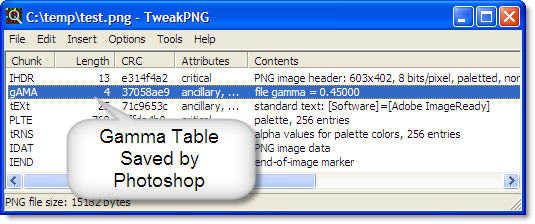
- There is no transparency support for the normal PNG-24 format (24 bit color) in IE 6. However, simple 1 bit transparency, like GIF files, is supported with the PNG-8 format (8 bit color).
Tip #2: Use PNG Images For Screenshots, Buttons and Logos
The Deflate compression algorithm used by PNG always preserves the original image, unlike the JPEG format which allows a trade-off between image quality and size. The screen shots below show how the image can become degraded with JPEG:
300% zoomed view of medium quality JPEG:
300% zoomed view of equivalent PNG:


So, if you need to display screen shots, logos, buttons or other artwork then you should use PNG files to avoid the sort of compression artifacts seen above. It is possible to save a JPEG image with 100% quality (i.e. lossless) but the file ends up being much larger than the equivalent PNG.
Tip #3: Consider Replacing GIFs With PNGs
A GIF file of more than a few hundred bytes will usually be smaller if it is converted to an equivalent PNG. You can achieve even greater savings if you use the PNG-8 format (8 bits per pixel) compared to the usual PNG-24 (24 bits of color per pixel) format.
However, if you need animated images you’ll have to stick with GIF files because PNG has no animation support.
Tip #4: Don’t Use PNGs For Photos
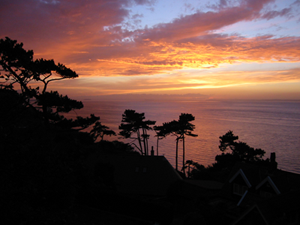
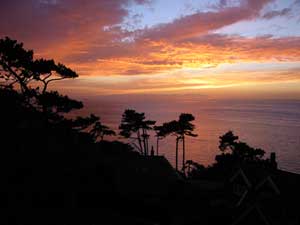
The compression algorithm used in JPEG was designed for photographic content. Although it does not exactly preserve the original image, very substantial savings can often be achieved without introducing any noticeable degradation. For example, the image shown below is over 10 times smaller as a JPEG rather than a PNG with no noticeable differences:
PNG – 24 bit color, file size 88 KB:
JPEG – saved as medium quality in Photoshop, file size 7 KB:
Tip #5: Not All PNGs Are Created Equal
There is some flexibility in the way the deflate compression is applied to an image in a PNG file. This means that if you save the same image in different graphical tools you’ll often see different files sizes. We tried saving the largest PNG from our web site in three different tools:
File size for 786 x 245 PNG image:
Adobe Photoshop: 104 KB
Paint Shop Pro: 105 KB
MS Paint: 132 KB
The file produced by the Windows built-in Paint program was nearly 30% larger than the output from Adobe Photoshop!
To get the smallest possible file size, use a post processing tool like PNGOut. With our sample image, it produced a PNG file size of 100 KB.
Adobe Photoshop saves a Gamma correction table in the PNG file that is designed to allow for differences in the brightness of displays. For more details know about Adobe Photoshop error 16 go to https://www.adobesupportphonenumber.com/blog/fix-adobe-photoshop-error-16/