

 Blog
BlogWhat does (Aborted) mean in HttpWatch?
 January 28, 2008 in
HttpWatch , Internet Explorer
January 28, 2008 in
HttpWatch , Internet Explorer
The result column in HttpWatch may sometimes display the value (Aborted) instead of an HTTP status code:
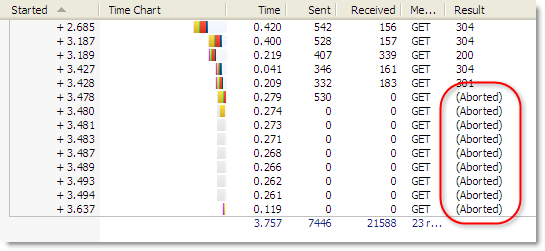
(Aborted) is one of three pseudo status codes that are used in HttpWatch to display information about HTTP requests that did not receive a status code from the server:
- (Aborted)
- (Cache)
- ERROR_*
The last two values are fairly straight forward. The (Cache) result is displayed when content is read directly from the browser cache with no network round-trip. If there’s no network round-trip, there’s no HTTP status code returned from the server. And the ERROR_* result (e.g. ERROR_INVALID_URL) is used when a request fails to complete because an error was detected by Internet Explorer.
The (Aborted) value is more complex in its origin. It occurs when IE has started to process the request for a URL (e.g. to download an image), but then decides to cancel the operation. Here are some examples of when this can occur:
- If you click on a link or bookmark while a page is downloading, or click on IE’s Stop button, you will see that IE cancels any requests which are still active and HttpWatch shows the (Aborted) result.
- A CSS rollover image on a page will start a request when the mouse pointer is moved into its active area. If the mouse pointer quickly moves away again, IE may abort the request if it has not already completed.
- Sometimes javascript is used to fire off requests for background tasks or to gather statistics on a page. Often this can lead to aborted results if the javascript does not wait for the response to be received from the server.
A common question is “Will our server receive requests that ended up being aborted?”. The answer is that it depends when the request was aborted. By looking at the timing chart in HttpWatch you can determine how far the request was through its normally processing cycle before it was cancelled.
Here’s an example of a request that was aborted while a connection was being made:
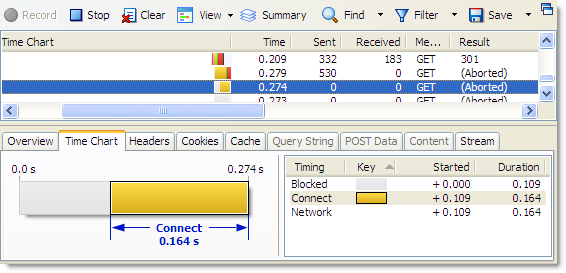
The server would not have received the HTTP request message in this case, because the Send state was not reached.
The request shown below was aborted when IE was awaiting a response and therefore the request would have been delivered to the server:
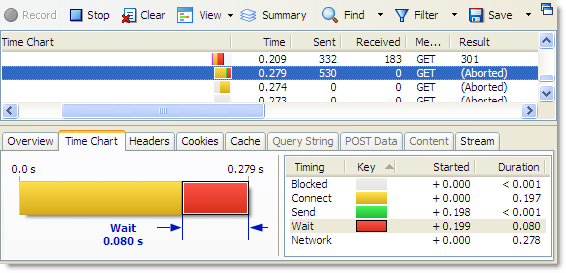
The presence of an (Aborted) entry in an HttpWatch log file is often just a consequence of the way that the user is interacting with a web site, rather than an indication that something has gone wrong.
I’d always assumed this was the case, but it’s good to have it confirmed by the experts!
I have the aborted comming up on a js file that I am trying to get to work in IE6 with a jQuery getScript call so its not all user related
I have also seen this when the same gif is used multiple times on a single page (like a grid of green_circle.gif). IE may download the gif several times before it realizes that it is now in the cache. All of the later requests will show (Aborted)
I received this error and was mildly confused at first. My confusion was dispelled by checking the response code that was attached to the request. It was a 502 proxy error. Moral of the story: check the response code and other information to build a complete picture of how the request was handled/responded to.
I got a result of HTTP 200, but the session’s property said “session state: Aborted” and “X-aborted-when: SendingResponse”. I’ve been confused for a long time.
Any thoughts about this?