February 10, 2012 We often get asked if we have a Mac version of HttpWatch. Unfortunately, the answer is no and it is likely to stay that way in the short term as it would take a significant amount of effort to port it to Mac OS X.
However, we decided to take a look if to see if there was a simple way to access HttpWatch on the Mac. Having used VMware extensively for testing HttpWatch on different versions of IE, Firefox and Windows the VMware Fusion product was an obvious candidate.
The result was much better than we initially hoped for. Vmware Fusion is able to run IE 9 and HttpWatch directly on the Mac desktop alongside other Mac applications:
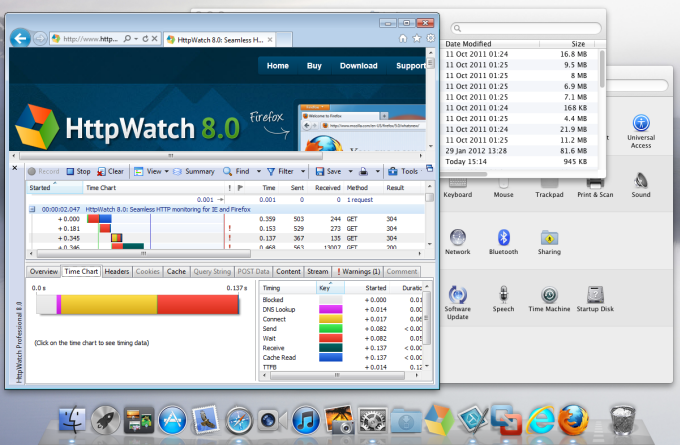
We were even able to setup short-cuts to directly run HttpWatch Studio from the Dock allowing it to open HttpWatch log files or HTTP Archive files (.HAR) stored on the Mac file system.
The rest of this blog post describes how we setup VMware Fusion to run HttpWatch, IE and the Windows version of Firefox. Parallels Desktop for Mac also seems to have similar capabilities and could probably be setup in a similar way.
We used the following software:
Our setup was created by following these steps:

Open the Virtual machine and interact with the Windows desktop to:
Once you’ve got the Windows VM machine configured and running select the View->Unity menu item in VMware Fusion. It will close the view of the Windows desktop and run Windows applications on the Mac desktop. It even displays icons from the Windows system tray on the Mac menu bar:

You can then start Windows applications that you want to use (e.g. IE or HttpWatch Studio) by going to the VMware Fusion dropdown menu and typing in the application name or selecting it from All Programs:
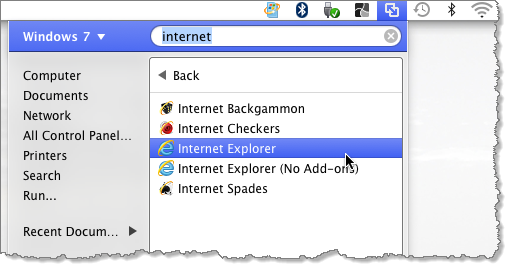
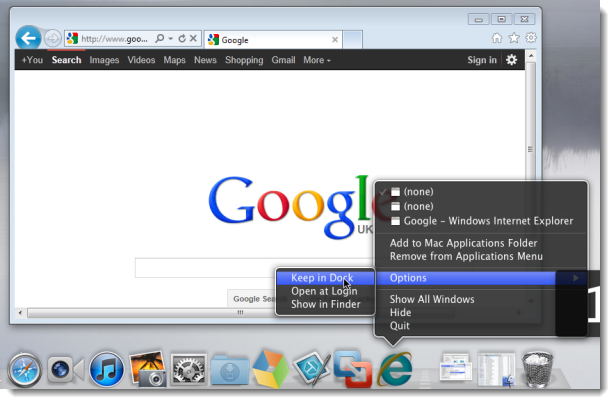
The application’s window will then appear on the Mac desktop and its icon will be in the Dock. By right clicking on the icon you can permanently add it to the Dock:
![]()
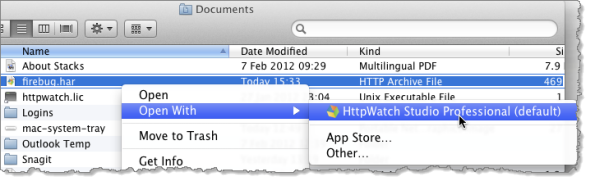
VMware Fusion also applies the file associations found in Windows. That allows you to directly open HAR or HWL files on the Mac directly into HttpWatch Studio:
Initially, we tried running VMware Fusion on a basic Mac mini with 2GB RAM. It was very sluggish at times; particularly when it first started up the Windows VM. However, a $ 46 memory upgrade to 8GB solved that issue allowing Windows applications to Start as quickly as native Mac applications.
We also did some comparisons, running page load tests with HttpWatch in IE 9 and Firefox 10. The performance of the Windows VM on the Mac wasn’t noticeably slower than a native Windows PC with a similar spec.

Posted on February 10, 2012 in
Firefox,HttpWatch,Internet Explorer
Tags: HttpWatch,Mac,OS X
RSS for this post |Trackback URL
September 21, 2011 Earlier this year Mozilla shifted from releasing a new version every year or so, to once every six weeks.
So in the previous four years we had five major new builds of Firefox, but this year we’ve already had versions 4, 5 and 6.
Releasing often seems like a good idea; unless you’re in a controlled corporate environment or you develop extensions for a living.
While changing to this new model, Mozilla largely gave up on backwards compatibility to speed up their development process. In the past many interfaces were said to be ‘frozen’ meaning that script based and native binary extensions could rely on using them at any point in the future. That’s all changed so anything can be updated. There’s no guarantee that code in an extension will work with a new version of Firefox.
For native binary components like HttpWatch the picture is much worse. Binary components must be recompiled to work with each new release:

That means it’s impossible for us to ship a version of HttpWatch that will work with a future release of Firefox. Also, we have to add at least one new DLL to our install program for every new Firefox release. It’s not just developer centric tools like HttpWatch that are affected. Even consumer focussed add-ons like RoboForm need updating for every Firefox release.
Of course, Chrome has always been frequently updated but it has a much smaller extension ecosystem because it doesn’t have the range of APIs available in Firefox or Internet Explorer. Therefore, the frequent updates to Chrome don’t cause as many issues because there are less extensions and the extension API is less likely to change as it is so much more restricted.
In comparison, Microsoft has been the master of backwards compatibility across versions of Internet Explorer. For example, HttpWatch 3.2 was last compiled nearly 5 years ago but still works with IE 9 on Windows 7:

IE’s longer release cycles and excellent backwards compatibility really appeal to corporate users compared to Firefox’s new release model.
There was even some talk of increasing the frequency of the Firefox releases to once every five weeks or less. The resulting discussion on Slashdot gave rise to these negative comments about the change:
Have they totally lost it? It’s not like the browser world is making sudden great progress. It’s a mature technology. The big problem today is getting stuff fixed.
Sorry i have other things to do than repackage FF for deployment every 5 weeks.
What FF user actually wants this model? Most of them don’t. Releasing at the same speed as Chrome isn’t going to win over Chrome users, but it will chase FF users off. That’s what we’re seeing here.
If they keep this up, I will remove it from our labs. I am not going to deal with this s**t. Release bug fixes as often as you need to, but new features need to be something that doesn’t happen too often. I can’t go and test this s**t every few weeks, nor do I want to deal with things that are outdated. I like FF, but this policy they have is pushing me to dump it. I haven’t yet, but we’ll see.
Extensions stop working at random without any good reason and in record time. So many of us use Firefox over Chrome because of extensions. This plan is just terrible.
Of course, we are biased because short release cycles for Firefox create more work for us. What do you think?
Posted on September 21, 2011 in
Firefox,HttpWatch,Internet Explorer
Tags: Firefox,HttpWatch,IE
RSS for this post |Trackback URL
June 10, 2011 Things are happening fast at Mozilla. Although Firefox 4 was only released three months ago, Firefox 5 is only days away from final release. We can also expect to see versions 6 and 7 later this year.
One of the major performance related changes in Firefox 5 is an improvement in the way that keep-alive HTTP connections are re-used. Previously, there was a simple FIFO queue. So if Firefox ever tried to reuse a TCP connection it would simply use the connection that had been idle for the longest period of time.
However, not all connections are equal. Connections that have transmitted the most data are likely to be faster than those that have only received a small amount of data. This effect is caused by the congestion window mechanism in TCP.
To find out more please take a look at John Rauser’s excellent and entertaining talk at last year’s Velocity conference:
TCP and the Lower Bound of Web Performance – John Rauser
Slides for TCP and the Lower Bound of Web Performance
One of the major changes in Firefox 5 is that it now sorts the idle connections by congestion window size. Connections with the highest congestion window will be used first as described in the related bug report:
Right now the idle persistent connection pool is a FIFO.
What really distinguishes different connections to the same server is the size of the sending congestion window (CWND) on the server. If the window is large enough to support the next response document then it can all be transferred (by definition) in 1 RTT.
Connections with smaller windows are going to be limited by the RTT while they grow their windows.
All else being equal, which as far as I can tell it is, we want to use the big ones. We cannot directly tell what the server’s CWND is of course, but the history of the connection provides a clue – connections which have moved large flights of data (single responses, or aggregate pipelines of responses) will have given the server the best chance for opening that window in the past.
We’ve just updated HttpWatch to work with Firefox 5 beta 5 and decided to see if we could measure any performance gain from this change. Initially, we were disappointed to find no obvious improvement. This was probably because the use of up to six connections per host name allows a fair amount of averaging out of the congestion window. Also, even if a re-used connection is particularly fast its effect may be swamped by the other resources being downloaded at the same time.
The blog post that originally described the benefit of the ordering of connections by congestion window size used a particularly scenario:
Using an experiment designed to show the best case, the results are better than I expected for such a minor tweak. This was my process:
- construct a base page mixed with several small and several large images plus a link to a 25KB image. There are 6 objects on the base page.
- load the base page – FF4 will use six parallel connections to do it
- click on the link to the 25KB image – this will use an idle persistent connection. Measure the performance of this load.
Based on this we tried the same sort of process. First opening the HttpWatch Overview page and then clicking on a link to open a full resolution screen shot:

The performance benefit we measured in this scenario was substantial. We consistently found that the screenshot image loaded about twice as fast in Firefox 5 as it did in Firefox 4.
Here’s the screen shot image being loaded in Firefox 4:

and then in Firefox 5:

With HttpWatch it’s possible to track how the browser uses connections. You can do this by adding the Client Port column to the main grid. Each new TCP connection will use a different local TCP port and this is a handy way to see how connections have been used on a page.
In Firefox 4 you can see that the screen shot image was loaded on the first connection that became idle:

This connection hadn’t done much work so its congestion window would have been relatively small.
In Firefox 5, the screenshot image was downloaded using the connection that had loaded the largest amount of data on the previous page. It would have a much larger congestion window and would therefore be able to download the image much more quickly:

Although, this relatively simple change in Firefox 5 typically didn’t make much difference in certain scenarios the performance improvement can be dramatic.
So how does IE 9 compare? It appears to use the same FIFO algorithm as Firefox 4 with similar loading times:

Posted on June 10, 2011 in
Firefox,HttpWatch,Internet Explorer,Optimization
Tags: Firefox 5,HttpWatch,IE 9
RSS for this post |Trackback URL