The latest update to HttpWatch adds support for Firefox 14 and includes a new AttachByTitle method on the Controller automation class:
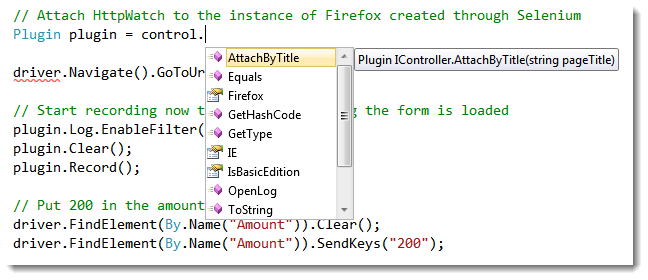
Previously, it wasn’t possible to attach HttpWatch to instance of IE created by the Selenium browser automation framework because Selenium doesn’t provide access to the IE’s IWebBrowser2 interface. The new AttachByTitle method makes it possible to attach HttpWatch to any instance of IE or Firefox so long as the page has a unique title.
For example, here’s the sample code included with HttpWatch 8.4 that demonstrates how to use a unique page title with Selenium:
// Use Selenium to start IE
InternetExplorerDriver driver = new InternetExplorerDriver( pathContainingIEDriverServer);

// Set a unique initial page title so that HttpWatch can attach to it
string uniqueTitle = Guid.NewGuid().ToString();
IJavaScriptExecutor js = driver as IJavaScriptExecutor;
js.ExecuteScript("document.title = '" + uniqueTitle + "';");

// Attach HttpWatch to the instance of IE created through Selenium
Plugin plugin = control.AttachByTitle(uniqueTitle);

driver.Navigate().GoToUrl(url); |
// Use Selenium to start IE
InternetExplorerDriver driver = new InternetExplorerDriver( pathContainingIEDriverServer);
// Set a unique initial page title so that HttpWatch can attach to it
string uniqueTitle = Guid.NewGuid().ToString();
IJavaScriptExecutor js = driver as IJavaScriptExecutor;
js.ExecuteScript("document.title = '" + uniqueTitle + "';");
// Attach HttpWatch to the instance of IE created through Selenium
Plugin plugin = control.AttachByTitle(uniqueTitle);
driver.Navigate().GoToUrl(url);
If you wanted to use Firefox, Selenium and HttpWatch together the only change required is the use of the FirefoxDriver class instead of the InternetExplorerDriver:
// Need to base Selenium profile on an existing Firefox profile that has HttpWatch enabled
FirefoxProfile defaultProfile = (new FirefoxProfileManager()).GetProfile("default");
IWebDriver driver = new FirefoxDriver(defaultProfile);

// Set a unique initial page title so that HttpWatch can attach to it
string uniqueTitle = Guid.NewGuid().ToString();
IJavaScriptExecutor js = driver as IJavaScriptExecutor;
js.ExecuteScript("document.title = '" + uniqueTitle + "';");

// Attach HttpWatch to the instance of Firefox created through Selenium
Plugin plugin = control.AttachByTitle(uniqueTitle);

driver.Navigate().GoToUrl(url); |
// Need to base Selenium profile on an existing Firefox profile that has HttpWatch enabled
FirefoxProfile defaultProfile = (new FirefoxProfileManager()).GetProfile("default");
IWebDriver driver = new FirefoxDriver(defaultProfile);
// Set a unique initial page title so that HttpWatch can attach to it
string uniqueTitle = Guid.NewGuid().ToString();
IJavaScriptExecutor js = driver as IJavaScriptExecutor;
js.ExecuteScript("document.title = '" + uniqueTitle + "';");
// Attach HttpWatch to the instance of Firefox created through Selenium
Plugin plugin = control.AttachByTitle(uniqueTitle);
driver.Navigate().GoToUrl(url);
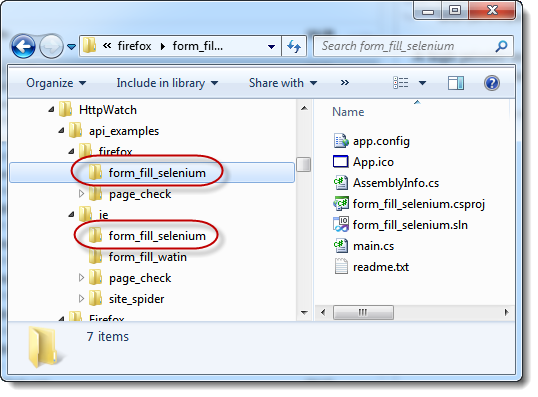
You can find these sample programs in the HttpWatch program folder after you install version 8.4:


 April 3, 2014 in
HttpWatch , Internet Explorer
April 3, 2014 in
HttpWatch , Internet Explorer