
August 12, 2010 In our last post Asynchronous Google Analytics is Better but Not Faster, we ran some tests using HttpWatch in Firefox 3.6 and IE 8 to see if the asynchronous version of the Google Analytics (GA) script was really faster as many have claimed.
We found the following:
Our overall conclusion was that due to point 4) the asynchronous version of GA was worth using because you were more likely to get analytics data from slow pages. The only potential performance benefit we found was in item 2) but we ignored that because:
One of the comments we received was that we should really have tested with IE 6 and 7 as those browsers are more prone to script blocking issues.
So, here are the condensed results of running the same tests in IE 6 and 7:
As before there was no significant performance advantage. Here are the IE 6 time charts with an empty cache:
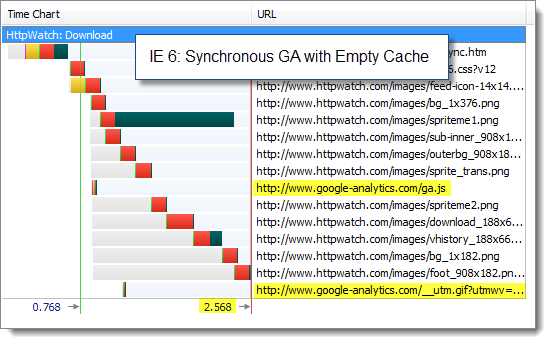
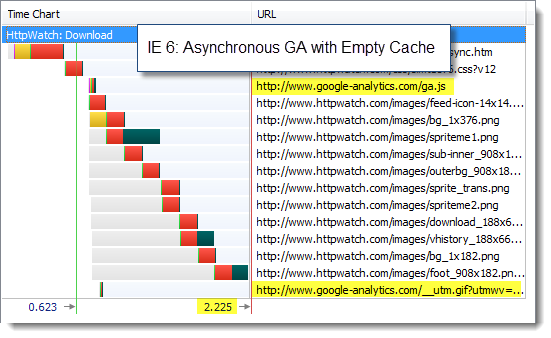
And the IE 7 charts with a primed cache:
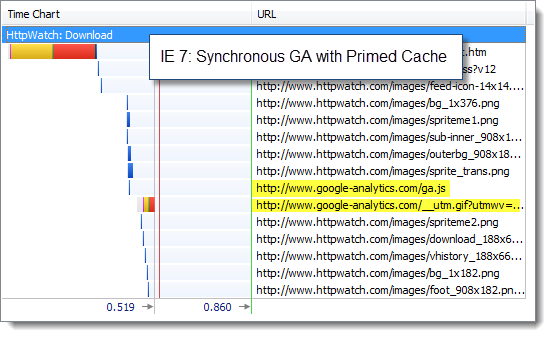
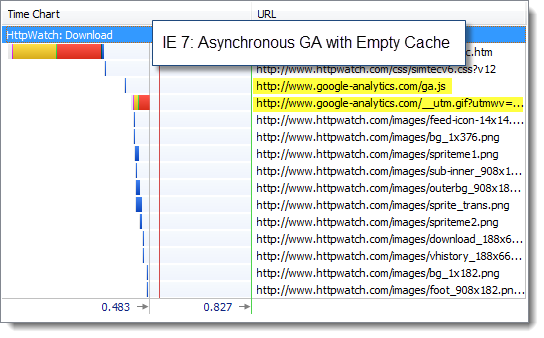
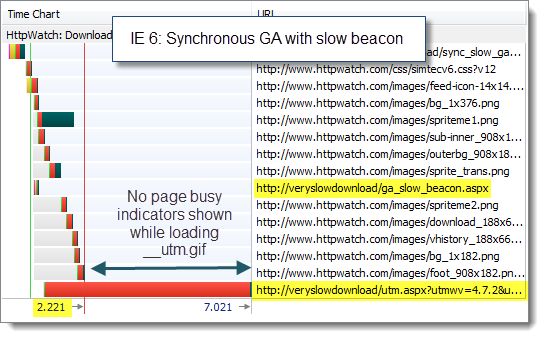
We found that IE 6 and 7 behaved the same as IE 8 when we simulated the slow download of the GA image beacon. It didn’t matter which version of the GA script we used. The image always downloaded in the background without affecting the page load time:
![]()
When we tried slowing the download of the ga.js file, we found that IE 6 and IE 7 benefited from the asynchronous version of GA in the same way as IE 8:
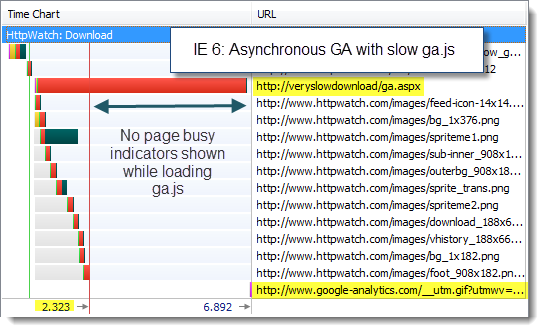
Again, we saw the same behavior as IE 8. Using the asynchronous version of GA increased the chance of collecting analytics data when a user left a page early.
We found no differences in our tests with IE 6 and IE 7 compared to IE 8. Asynchronous GA is worth using because it increases the chance of gathering data from slow pages, but you shouldn’t expect to see faster page load times unless you encounter a slow, uncached ga.js file in IE.
So why doesn’t asynchronous GA deliver significant performance gains as widely claimed? We believe it is down to the following factors:
Posted on August 12, 2010 in
HttpWatch,Javascript,Optimization
Tags: Google Analytics,HttpWatch,IE
RSS for this post |Trackback URL
I appreciate that you’re trying to be thorough about this, but you really need to test more than one page to declare that async GA is not faster.
Your results have more to do with the atypical nature of your test page than the browser you’re using. It contains no scripts other that ga.js and all but one image is loaded via CSS. Your results would be wildly different on different pages.
Brian,
Do you have a page in mind where sync GA adds a significant performance penalty? If so, we’d be happy to take a look.
If GA sync can’t be shown to cause a problem, it would be hard to justify moving to async GA for performance reasons alone.
Although, our page is relatively lightweight in terms of scripts and images you might find that the overhead of GA becomes even more insignificant on a more heavyweight page.
It’s hard to imagine how the re-ordering of the few hundred milliseconds of GA script and beacon overhead is going to wildly impact on the loading of other scripts and images on a page.
Here’s a simple example:
http://async.nfshost.com/examples/slowga/sync.html
http://async.nfshost.com/examples/slowga/async.html
This should demonstrate how the legacy GA snippet blocks subsequent content like images from rendering and blocks subsequent scripts from executing.
I completely agree that under normal circumstances, ga.js loads very quickly. As you’ve pointed out, if your site is already very fast or very slow, performance probably won’t be your only reason for switching to async.
But in cases like mobile or international connections, ga.js may take longer than 200ms to load. Because of this uncertainty, Google recommends that the legacy snippet should go at the bottom of the page, so there isn’t a chance that it blocks any content. The purpose of the async snippet is to remove that uncertainty and allow you to put the snippet at the top of the page so you can capture more visits without worrying about damaging user experience.
In the context of a single pageview, a couple hundred ms may not seem like a lot. But spread out over the entire web, it starts to add up. Beyond making your Google Analytics data more accurate, Google wants to do everything it can to help speed up the web.
Brian,
Those pages are the same as our test where we slowed down the loading of ga.js, but you have changed the standard sync GA snippet by not placing it at the bottom of the <body> tag.
That’s not really a fair comparison of the recommended sync and async GA snippets. Even allowing for that:
1) You need to artifically slow down GA to see a significant difference.
2) The async snippet only makes a difference if qa.js is not already cached. The chances of that are low since it is normally cached for a day by any page or site that uses GA
3) Have you tried your sample async page in Firefox with an empty cache? Although the image on the page is displayed without a pause, the page stays in the loading state with tab and status bar busy indicators. To a user it will look like the page is still loading even though it may be visually complete
We agree on the benefit of async GA:
“The purpose of the async snippet is to remove that uncertainty and allow you to put the snippet at the top of the page so you can capture more visits without worrying about damaging user experience. ”
Using GA async helps you to capture more user visits. However, if you replace the recommended sync GA snippet with the async GA snippet you really can’t expect to see significant performance increases in real world scenarios.
Here is another example:
http://async.nfshost.com/examples/onload/sync.html
http://async.nfshost.com/examples/onload/async.html
This should show how the async snippet can increase parallelism in a page so that the total page load time is reduced even when the sync version was at the bottom.
Don’t put too much faith in browser caches. Real cache lifespan is generally much smaller than what you ask for in your HTTP headers. It looks like browser vendors are starting to pay more attention to this though.
Yes, if you artifically slow up ga.js then async GA can provide a benefit.
We’re not trying to put people off async GA – we just don’t want people telling their management that the change is going to speed up their site for an average user. It would be better to say that it more likely to collect analytics data and there may be some benefit if GA had performance problems.
If you have a look with HttpWatch you’ll see that ga.js really does get cached – at least with Firefox and IE. It’s also eligible for caching in proxies too because it has Cache-Control: public.
Apparently, a third of the top 500 sites use GA so there’s a pretty good chance that a user will already have ga.js in their cache:
http://royal.pingdom.com/2008/05/28/google-analytics-dominate-the-top-500-websites/
Pingback: The three biggest performance problems with third-party content (and how to fix them) — Web Performance Today
Very good article, but Brian is right.
To conclude what is best for a 3th party script, first you must thought that this snippet will be used on very differents enviroments. Users, browsers, pages, connections,..
We change the snippet on sonico.com (we have more than 5M request at day). For client-side measures we are using an adaptation of jiffy-web. The final result is that users won more than 300ms using the new script.
Furthermore, I found that change the closure statment by setTimeout is a very good idea on IE.
Here the examples and the test:
http://tips.freedev.com.ar/demos/ga/normal_async.html
(http://www.webpagetest.org/result/100824_3G3E/1/details/)
http://tips.freedev.com.ar/demos/ga/timer_async.html
(http://www.webpagetest.org/result/100824_3G3N/1/details/)
You can try that change and re-test your page ;).
Pingback: The evolution of ga.js and The best google analytics snippet.
Pingback: La evolucion de ga.js y el mejor script de Google Analytics